
Oven not heating
Check the settings, the breaker and the heating part you can see, and know when it’s a job for a technician.
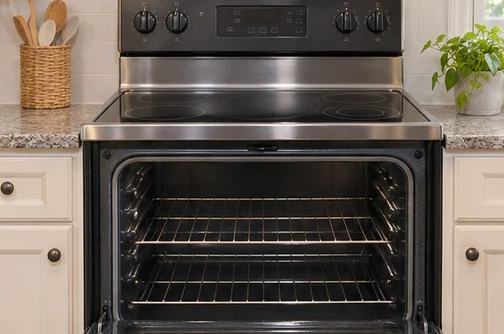
Short answer: Often a setting like Control Lock, Delay Start or Demo mode is on, or the breaker has tripped. Check those, then see whether an electric oven’s bake element glows red or a gas oven shows an error code. A cracked element, a bad igniter or a breaker that trips again is a job for an appliance technician.
Check the warning signs below first.
Use this guide at your own risk. It’s general information, not professional advice. By using it, you agree to our Terms of Use and Safety Waiver.
Check for danger first
If any of these are present, stop here.
- Gas odor, smoke or fire. Leave immediately. From outside, call emergency services. For a gas odor, also call the gas utility. Leave lights and switches alone.
- Burning smell, scorch marks, a hot outlet or a buzzing panel. Stop and call an electrician. Stay clear of a suspect panel.
- Water near electrical equipment or exposed wiring. Keep away. Never cross water to reach a plug or breaker. Call a qualified electrician.
None of these warning signs? Open the checks
What to check
Have ready. The owner’s manual, a flashlight, and whether your oven is electric or gas.
Check the settings.
Make sure it’s set to Bake and you pressed Start. Turn off Control Lock (often by holding the button for 3 seconds), cancel any Delay Start, and turn off Demo or Sabbath mode the way your manual shows. In Demo mode the oven won’t heat.
Check the breaker.
An electric oven uses a 240-volt breaker that takes up two spaces in the panel. If it has tripped, switch it fully off and then on once. If it trips again, leave it off and call an electrician.
Electric: look at the bake element.
With the oven off and cool, look at the lower element for cracks or breaks. Then set it to Bake and watch through the window: a working element glows red. Don’t touch it.
Gas: look for an error code.
A gas oven’s igniter has to glow before the burner lights. If the oven won’t light, check the display for an error code and look it up in your manual. Don’t remove panels or work on the igniter or gas parts.
When to stop. If the element is cracked or doesn’t glow, the gas burner won’t light, or the breaker trips again, stop and call an appliance technician. If you smell gas, leave now and call the gas utility from outside.
What it costs
- The checks above: free.
- Pro oven repair: $150–$400, often about $200.
- Common fixes: a bake element, $100–$300; a gas igniter, $200–$350.
- Many people pay $136–$346 for a stove or oven repair.
National US ranges from 2025–2026 cost guides: Fixr · Thumbtack. Prices in your area may differ.
Common causes
- Control Lock, Delay Start or Demo mode is on. With Control Lock or Demo mode on the oven won’t operate, and a delayed bake won’t start until its start time. You can check
- Tripped breaker. An electric oven needs 240 volts from a two-pole breaker, and a gas oven still needs 120 volts for its controls and igniter. You can check
- Burned-out bake element. On an electric oven, a cracked or broken lower element has to be replaced. Call a pro
- Failed gas igniter. The igniter has to glow for the burner to light, and when it fails many ovens show an error code. Call a pro
- Temperature sensor or control board. If the element or igniter is fine, the sensor or control that tells it to heat may have failed. Call a pro
Sources: Whirlpool · GE Appliances · LG · iFixit.
Further reading · GE Appliances
Still stuck? Get help with your exact problem.
Snap a photo and tell the app what you’ve tried. It walks you through your model, one safe step at a time, and tells you when to call a pro. Your first fix in the app is free.
The app is coming soon. Get one email the day it launches.
One email when the app launches. No spam. Privacy Policy