Garage door won’t close
Find out whether the safety sensors, the LOCK button or something in the door’s path is stopping it, and when a spring or cable makes it a pro job.
Short answer: Usually a safety sensor is blocked, dirty or out of line, or the LOCK button on the wall control is on. Clear the path, clean and line up the sensors until both lights glow steadily, check the LOCK button and look along the tracks. If a spring or cable is broken or the door binds or hangs crooked, stop and call a garage door professional.
Check the warning signs below first.
Use this guide at your own risk. It’s general information, not professional advice. By using it, you agree to our Terms of Use and Safety Waiver.
Check for danger first
If any of these are present, stop here.
- Gas odor, smoke or fire. Leave immediately. From outside, call emergency services. For a gas odor, also call the gas utility. Leave lights and switches alone.
- Burning smell, scorch marks, a hot outlet or a buzzing panel. Stop and call an electrician. Stay clear of a suspect panel.
- Water near electrical equipment or exposed wiring. Keep away. Never cross water to reach a plug or breaker. Call a qualified electrician.
None of these warning signs? Open the checks
What to check
Have ready. A flashlight, a soft dry cloth, and your opener’s brand and model from its manual or label.
Clear the path and look at the sensor lights.
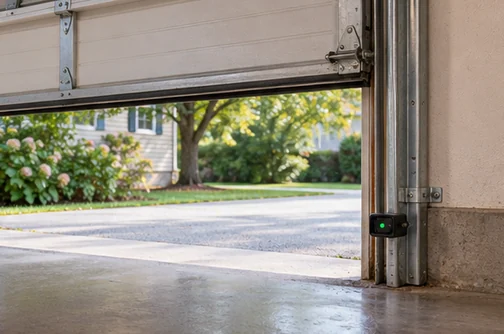
Remove anything in the doorway or near the two small sensors close to the floor. The sending sensor’s amber light and the receiving sensor’s green light should both glow steadily. If the opener’s lights flash 10 times, it’s a sensor problem.
Clean and line up the sensors.
Wipe both lenses clean so nothing blocks the beam. If a sensor light is off or flickering, loosen its wing nut, point the lenses at each other until the light glows steadily, then tighten the nut. Bright sun shining on a sensor can block the beam too.
Check the LOCK button.
If the wall control works but the remotes don’t, and the opener lights flash twice, the LOCK feature is on. Press LOCK on the wall control to turn it off, then try the remote.
Look along the tracks.
With the door stopped, look for anything in the tracks or under the door that could block it, and clear away loose debris. Don’t loosen, bend or adjust the tracks, springs, cables or brackets.
When to stop. If a spring or cable is broken or frayed, or the door sticks, binds, hangs crooked or looks out of balance, stop using it and call a garage door professional. Springs and cables are under extreme tension. If the door doesn’t stop and reverse when the sensor beam is blocked, don’t use the opener until a pro checks it.
What it costs
- The checks above: free.
- Pro safety sensor repair or replacement: $85–$250.
- Spring replacement: $120–$350, often about $250.
- Cable repair or replacement: $85–$400.
National US ranges from 2025–2026 cost guides: Fixr · Modernize. Prices in your area may differ.
Common causes
- Something blocking the beam. Anything between the two sensors breaks the invisible beam, and the opener won’t close the door. You can check
- Sensors dirty or out of line. If the lenses are dirty or don’t point at each other, a sensor light goes off or flickers and the door won’t close. You can check
- Sun shining on a sensor. The sun’s rays can interfere with the sensor’s infrared beam. You can check
- LOCK turned on. When LOCK is on, the wall control still works but the remotes are locked out. You can check
- Sensor wiring. Cut, loose, reversed or shorted sensor wires keep the door from closing, just like a blocked sensor. Call a pro
- Broken spring or cable. Springs and cables are under high tension and should be repaired only by trained door technicians. Call a pro
Sources: Chamberlain · Chamberlain maintenance · Genie · DASMA.
Further reading · Chamberlain
Still stuck? Get help with your exact problem.
Snap a photo and tell the app what you’ve tried. It walks you through your model, one safe step at a time, and tells you when to call a pro. Your first fix in the app is free.
The app is coming soon. Get one email the day it launches.
One email when the app launches. No spam. Privacy Policy