Furnace fan won’t stop running
Tell whether a thermostat setting is keeping the fan on or a part in the furnace has failed.
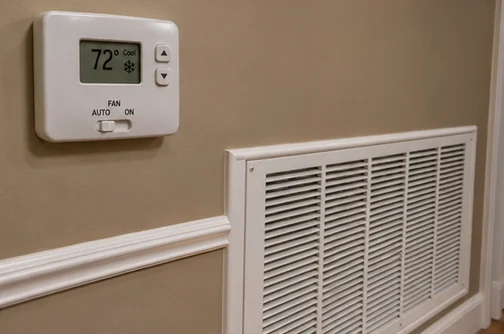
Short answer: Most often the thermostat’s fan is set to ON or Circulate instead of AUTO, or a schedule turns it on. Set the fan to AUTO, check the schedule, replace a dirty filter and test with the thermostat OFF. If it still runs, a relay, limit switch, control board or wiring needs an HVAC technician.
Check the warning signs below first.
Use this guide at your own risk. It’s general information, not professional advice. By using it, you agree to our Terms of Use and Safety Waiver.
Check for danger first
If any of these are present, stop here.
- Gas odor, smoke or fire. Leave immediately. From outside, call emergency services. For a gas odor, also call the gas utility. Leave lights and switches alone.
- Burning smell, scorch marks, a hot outlet or a buzzing panel. Stop and call an electrician. Stay clear of a suspect panel.
- Water near electrical equipment or exposed wiring. Keep away. Never cross water to reach a plug or breaker. Call a qualified electrician.
None of these warning signs? Open the checks
What to check
Have ready. Your thermostat’s manual or app, fresh batteries if it uses them, and a new furnace filter.
Set the fan to AUTO.
On AUTO, the fan runs only while the system is heating or cooling. On ON, it runs all the time. Press the FAN button or open the fan menu and choose AUTO.
Check for Circulate and fan schedules.
Some thermostats have a Circ setting that runs the fan at random times, about a third of the time on many Honeywell models. Programmable and smart thermostats can also set a fan mode for each schedule period, so check each one.
Replace a dirty filter.
If the filter is gray or clogged, replace it. Then give the system a couple of hours to see if it stops running nonstop.
Turn the thermostat to OFF.
With the system OFF and the fan on AUTO, the fan should stop. If it keeps running, the problem is in the furnace or its wiring, not a setting. To stop it until help comes, switch off the furnace’s power switch or its breaker.
When to stop. If the fan still runs with the thermostat on AUTO and OFF, call an HVAC technician. A stuck relay, a bad limit switch, a control board or a wiring fault needs a pro. Don’t open the furnace panels or take the thermostat off the wall to test its wires.
What it costs
- The checks above: free.
- Pro furnace repair: $349–$650, about $485 on average.
- Common fixes: a limit switch, $66–$122; a control board, $390–$725.
- Many HVAC companies charge a flat service fee, about $69 on average.
National US ranges from 2025–2026 cost guides: Fixr · Thumbtack. Prices in your area may differ.
Common causes
- Fan set to ON. On ON the fan runs all the time; on AUTO it runs only while the system heats or cools. You can check
- Circulate mode or a fan schedule. A Circ setting or a schedule period can run the fan at times when the system isn’t heating. You can check
- Dirty filter. A clogged filter makes the system work harder; Trane says to replace it first. You can check
- Faulty limit switch. If the limit switch fails, the furnace can’t tell when to turn off and runs continuously. Call a pro
- Stuck relay or control board fault. A relay or control board that keeps sending power to the blower needs a technician. Call a pro
- Thermostat wiring problem. Thermostat wiring can come loose or go bad and keep the fan on. Call a pro
Sources: Trane · Honeywell Home · Trane air handler.
Further reading · Trane
Still stuck? Get help with your exact problem.
Snap a photo and tell the app what you’ve tried. It walks you through your model, one safe step at a time, and tells you when to call a pro. Your first fix in the app is free.
The app is coming soon. Get one email the day it launches.
One email when the app launches. No spam. Privacy Policy